

Blister packaging machines are the pulse of a solid-dose packaging line, forming cavities, feeding tablets or capsules, applying lidding foil, and moving finished packs toward cutting and discharge. When that rhythm slips, weak seals, malformed cavities, empty pockets, foil wrinkles, and registration errors can quickly create rejects, downtime, and wasted packaging material. Seal failures deserve particular attention because a pack can appear normal while its barrier performance may already be compromised. A useful shop-floor rule is to watch four things first: heat, pressure, movement, and material—many recurring faults leave clues in at least one of them.
Effective blister packaging machine troubleshooting follows those clues instead of relying on trial-and-error adjustment. The sections below cover common packaging, mechanical, utility, and control faults found on a blister packing machine, along with practical checks and the point where recurring failures begin to indicate a deeper maintenance or machine-design issue.
Safety note: Before inspecting tooling, rollers, sealing components, cutting parts, or electrical systems, stop and isolate the machine according to the manufacturer’s instructions and your site’s safety procedures. Never bypass guards or safety interlocks during troubleshooting.
Weak or Inconsistent Blister Seals
What you see: The lidding foil peels away too easily, part of the seal remains open, or one area repeatedly fails the plant’s approved seal-quality or integrity check. If the fault affects the full web, look first at shared process or material conditions. If it stays in one lane or along one edge, local tooling contact deserves more attention.
Why it happens: Temperature is only one possible cause. Seal quality depends on sealing temperature, pressure, contact time, line speed, foil coating, forming web, and sealing-surface condition. Dust, adhesive buildup, damaged tooling, uneven pressure, incorrect web position, or a different material lot can all reduce effective contact.

Checks and fixes:
- Confirm the actual sealing temperature. Verify the sealing-surface temperature using an approved, calibrated method and compare it with the validated range for the forming web and lidding foil combination.
- Inspect sealing contact. Check the sealing plate or roller, pressure components, tooling surface, and alignment.
- Remove contamination. Stop and isolate the machine before cleaning a hot sealing area. Remove dust, adhesive residue, and packaging fragments.
- Check the material. If the problem starts after a film or foil change, confirm specification, orientation, roll condition, and coating compatibility.
- Review speed and contact time. A seal that works at low speed but weakens at production speed points toward heat transfer, pressure stability, dwell, or web movement.
Field note: If only one lane is failing, a machine-wide increase in temperature or pressure may affect stable lanes without correcting the local cause.
Shallow, Collapsed, or Uneven Blister Cavities
What you see: Pockets are too shallow, cavity depth varies across the web, one side looks stretched, or tablets and capsules no longer sit correctly inside the pocket. More severe blister forming defects include folds, thinning, tearing, and incomplete cavities.
Why it happens: With thermoformed materials, the web must reach a suitable forming condition before vacuum, compressed air, or mechanical assistance shapes it into the mold. Uneven heating, blocked air passages, unstable forming pressure, damaged seals, tooling misalignment, insufficient cooling, or material variation can all change cavity geometry.
On a pharmaceutical blister machine, Alu-Alu cold forming follows a different process and relies on the behavior of the cold-form laminate and tooling rather than thermoforming heat.
Checks and fixes:
- Check forming conditions. Confirm that the web reaches the material-appropriate temperature and that heating is uniform.
- Inspect air passages. Blocked mold vents, leaking lines, unstable pressure, or damaged seals can produce shallow pockets.
- Check mold alignment. A defect that repeats in the same cavity position usually points toward local tooling or air flow.
- Verify cooling. Poor cooling can allow a newly formed cavity to distort before downstream operations.
- Compare the material lot. Thickness variation, shrinkage, or poor roll condition can create defects that machine adjustment alone cannot remove.

Film and Foil Wrinkling, Tearing, or Tracking Problems
What you see: The forming web moves sideways, lidding foil enters sealing with wrinkles, material edges tear, or operators repeatedly correct tracking. Some faults appear only after production speed increases.
Why it happens: The visible wrinkle is often downstream from the actual cause. Uneven unwind tension, incorrect roll loading, non-parallel guide rollers, contamination, damaged edges, unstable web transport, or a sensor problem may disturb the material several stations earlier.
Checks and fixes:
- Trace the web from the unwind. Find the first point where it stops running flat and centered.
- Check roll loading and tension. Make sure the roll sits squarely and unwinds without excessive side pull.
- Inspect guide rollers. Check alignment, bearings, contamination, and surfaces contacting the web.
- Check tracking sensors where fitted. Clean photoelectric lenses and verify reliable detection.
- Compare low and full speed. A fault that appears only after acceleration suggests dynamic tension, transport synchronization, or roller condition.
Field note: Do not correct a downstream wrinkle until you know where the web first became unstable.
Feeding Problems: Empty Pockets, Double Feeds, and Product Damage
What you see: Empty blister pockets reach inspection, two products enter one cavity, tablets jump out of position, capsules become damaged, or the feeder repeatedly bridges or jams.
Why it happens: On blister packaging equipment, a feeding fault is not always a feeder fault. Tablet or capsule dimensions, coating, dust, static, surface friction, and flow behavior can change feeding performance. Worn guides, unsuitable vibration, poor feeder setup, or synchronization errors can produce similar symptoms.
Checks and fixes:
- Compare the product batch. If the fault begins with a new tablet or capsule batch, check product behavior before completely retuning the feeder.
- Clean the feeding path. Powder and fragments can alter movement through tracks, guides, brushes, and feed plates.
- Adjust the feeder to the product. Check openings, guide height, brush position, retaining parts, and vibration.
- Check synchronization. Product delivery must match pocket position and indexing.
- Test at a lower speed. If empty pockets disappear immediately, investigate delivery rate, timing, or vibration at the target output.
- Check air or vacuum stability where used. Utility fluctuations can make a correctly adjusted feeding system appear unstable.
Registration, Indexing, and Coding Drift
What you see: Printed information shifts, cavities move relative to sealing or cutting, or batch coding gradually walks across the lidding material. Some errors build slowly; others appear immediately after restart, roll replacement, or changeover.
Why it happens: Accurate registration on a blister packing machine depends on repeatable web transport. Tension variation, slipping traction components, incorrect index settings, wear, sensor contamination, or poor format setup can all shift position. On servo-driven systems, position feedback and synchronization also become part of the diagnostic path.

Checks and fixes:
- Separate gradual drift from sudden offset. Gradual movement points toward transport, tension, wear, or feedback. Sudden movement often follows setup or material changes.
- Stabilize web transport first. Check guides, pulling components, tension, and alignment.
- Verify index length. Confirm that the programmed stroke matches the installed format.
- Clean registration sensors. Poor contrast or contamination can cause inconsistent alignment.
- Recheck after changeover. Tooling, sensor position, recipe, and station alignment should return to established reference positions.
Sensor, Inspection, and Reject-System Errors
What you see: Good packs are rejected, missing-product alarms appear even though cavities are full, the vision system reports intermittent faults, or genuine defects pass inspection.
Why it happens: Depending on machine configuration, inspection can rely on photoelectric sensors, cameras, encoders, lighting, PLC logic, and reject confirmation. Dust, poor contrast, incorrect triggering, shifted sensors, changed product appearance, loose connections, or the wrong recipe can all produce false decisions.
Checks and fixes:
- Inspect the rejected pack. Confirm whether the reported defect actually exists.
- Clean sensors and optics. Dust, particles, adhesive residue, and fingerprints can alter detection.
- Check timing and position. The system must inspect the correct cavity at the correct point in the cycle.
- Verify the active recipe. Product color, foil graphics, and cavity layout can require different settings.
- Test the reject mechanism. Make sure the detected defective pack is the same pack physically removed downstream.
Cutting, Perforation, and Blister Burr Defects
What you see: Blister cards have rough edges, burrs, incomplete cuts, poor perforation, or remain partly connected. Sometimes the cut is clean but shifted relative to the cavity layout.
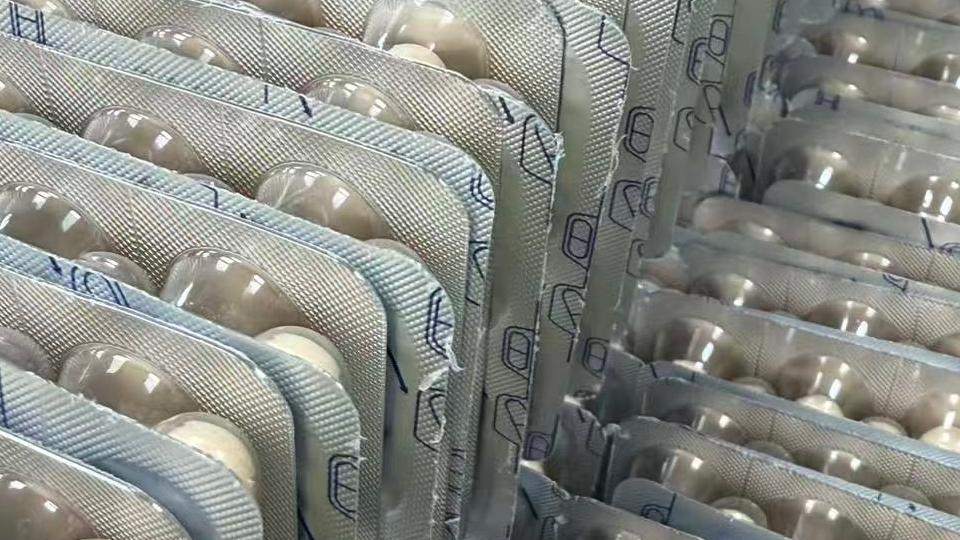
Why it happens: Worn punches, damaged dies, incorrect tool installation, excessive clearance, contamination, transmission wear, and unstable web position can all affect cutting quality. Upstream registration problems can therefore look like cutting-tool problems.
Checks and fixes:
- Confirm registration first. Make sure the blister arrives in the correct position.
- Inspect punch and die edges. Wear, chips, or buildup can create recurring burrs.
- Verify tool installation. Check seating, alignment, guides, and fasteners.
- Check mechanical transmission. Loose chains or inconsistent feed motion can shift cutting position.
- Remove trim and debris. Waste material can interfere with movement and separation.
Safety: Stop and isolate the machine before working near punches, dies, chains, or moving cutting components.
Electrical, Temperature-Control, and Utility Faults
Not every fault on pharmaceutical blister packaging equipment appears first as a packaging defect. Power, temperature control, compressed air, vacuum, cooling, and drive-system problems can affect several stations at once.
Machine Will Not Start or Frequently Trips
Check the incoming power supply, protective devices, phase sequence where applicable, emergency-stop circuit, safety interlocks, and motor or heater circuits. Repeated breaker trips should be treated as an electrical fault, not simply reset.
Electrical diagnosis should be performed only by authorized personnel.
Heating Does Not Rise or Temperature Becomes Unstable
Possible causes include a failed temperature sensor, thermocouple wiring problem, heater failure, relay or solid-state relay fault, controller problem, or loose electrical connection.
Before replacing the heater, confirm whether the controller is receiving a valid temperature signal and whether the heating circuit is actually being energized.
Air Pressure or Vacuum Is Too Low
Inspect the air supply, hoses, fittings, solenoid valves, filters, and vacuum components for leakage or restriction. Utility instability can affect forming, feeding, sealing, and pneumatic movements at the same time.

Drive System Jams or Makes Abnormal Noise
Stop the machine and inspect bearings, lubrication, gears, chains, belts, and the working area for foreign material. Gradually increasing noise can indicate wear or lubrication loss, while sudden noise after a changeover deserves immediate inspection.
Repeated Alarms, Jams, and Unexpected Machine Stops
What you see: The blister pack machine stops for recurring alarms, small jams return after reset, or a line that runs normally for a period suddenly begins suffering repeated interruptions. The final alarm may identify where the machine stopped rather than where the fault began.
| When the Fault Appears | Check First | Avoid Assuming |
|---|---|---|
| Only at high production speed | Feeding, timing, transport, synchronization | Stable low-speed running means no problem |
| After a long production run | Heat buildup, residue, lubrication, wear | Startup condition stays unchanged |
| Immediately after changeover | Tooling, recipe, sensor position, alignment | One offset correction solves everything |
| After a film or foil roll change | Roll loading, material condition, tension | Every roll behaves identically |
| Random intermittent stops | Sensors, utilities, connections, looseness | Reset is a permanent repair |
| Same station repeatedly | Local mechanism and upstream conditions | The final stopped station must be the root cause |
Checks and fixes:
- Read the alarm history. Look for the first abnormal event, not only the final stop.
- Compare operating conditions. Speed, batch, material lot, run time, and recent adjustments can reveal a pattern.
- Inspect buildup and wear. Many mechanical faults develop gradually before a complete stop.
- Check shared utilities. Air, vacuum, cooling, and electrical faults can affect several stations.
- Do not rely on repeated resets. Reset restores production temporarily; it does not remove the cause.
How to Prevent Recurring Blister Machine Problems
Preventive maintenance for blister packaging equipment should establish a stable operating baseline and make recurring faults easier to recognize.
Record approved recipes, packaging materials, feeder configuration, index settings, inspection parameters, and normal operating speed for each format. After a significant fault, record the symptom, affected station, product or material batch, operating condition, corrective action, and whether the problem returned.
Routine maintenance should include cleaning forming molds, tracks, and sealing surfaces; checking cooling and air/vacuum systems; inspecting sensors; and monitoring belts, chains, bearings, feeding parts, sealing tooling, and cutting tools for wear.
After each changeover, reconfirm tooling location, feeder setup, sensor position, web path, and the selected recipe before returning to normal production speed.
When Troubleshooting Is No Longer Enough
Some recurring blister machine problems eventually stop being adjustment problems.
If the same failures return after maintenance, the machine must run below the required speed to remain stable, operators spend excessive time realigning stations after changeover, or older controls and worn components create repeated interruptions, machine design and overall condition should become part of the investigation.
When comparing retrofit and replacement options for a pharmaceutical blister packing machine, consider traction repeatability, station alignment, sealing-pressure distribution, tooling changeover, maintenance access, inspection capability, and spare-parts support—not rated output alone.
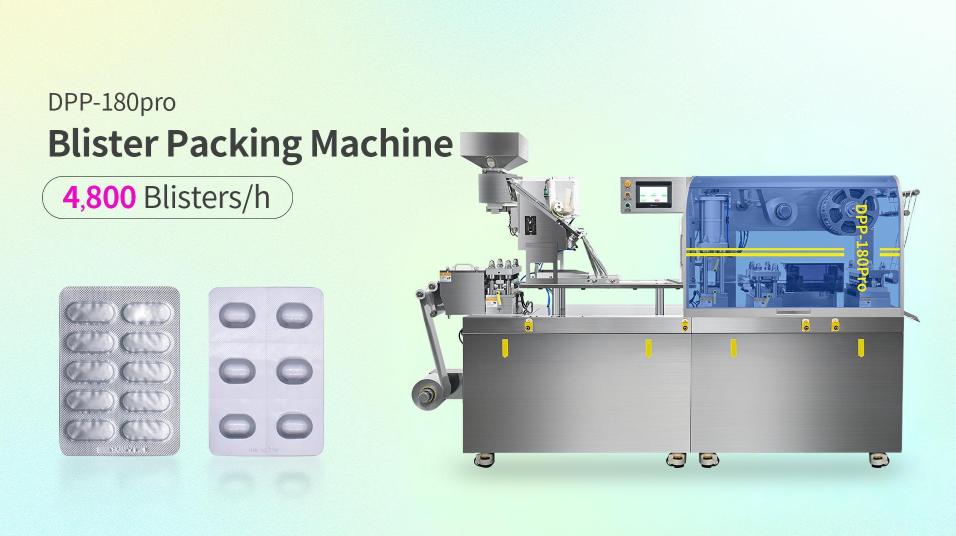
For example, Ruida Packing’s DPP-180Pro blister packaging machine uses servo traction, externally adjustable working stations, quick-change molds, and a dual-cylinder heat-sealing structure. These design features are relevant to several troubleshooting areas discussed above, including traction stability, station alignment, sealing-pressure consistency, changeover, and maintenance access.
FAQs On Blister Packaging Machine Troubleshooting
What should I check first if only one blister lane has weak seals?
Inspect local sealing contact, contamination, tooling condition, and alignment before changing a common temperature or pressure setting. A fault that remains in one lane usually deserves local investigation first.
Why do empty blister pockets appear only at higher machine speeds?
Higher speed can expose limits in feeder delivery, synchronization, vibration control, product flow, or cavity timing. Reduce speed temporarily to determine whether the problem is related to dynamic operation.
How can I tell where foil wrinkling starts?
Trace the web from the unwind and identify the first roller, guide, or station where the material stops running flat or centered. The wrinkle can become obvious at sealing even though it began upstream.
Why does a blister machine keep stopping after changeover?
Check tooling installation, recipe selection, feeder setup, sensor position, index settings, and alignment. Repeated post-changeover stops often point toward setup rather than a random component failure.
What should I check if the blister machine will not heat up?
Check the temperature sensor or thermocouple, heater, relay or solid-state relay, wiring, protective devices, and controller signal. Electrical testing should be carried out by qualified personnel with the machine safely isolated.
Can packaging material cause blister machine problems?
Yes. Changes in film thickness, foil coating, roll winding, material stiffness, surface condition, or storage can affect forming, sealing, tracking, and registration. Compare the new material with the last stable run before making large machine adjustments.
Conclusion
Effective blister packaging machine troubleshooting starts with the pattern of the fault, not with changing every available setting. Weak seals, malformed cavities, empty pockets, web wrinkles, registration drift, false rejects, cutting defects, utility problems, and repeated alarms each provide clues about where the process has moved away from stable operation.
Check what changed, compare local and full-web defects, and verify the components directly involved before making large adjustments. When a correction works, confirm that it remains stable under normal production conditions.
When the same failures keep returning despite correct setup and preventive maintenance, look beyond individual parameters. Tooling condition, traction design, controls, station adjustment, and overall machine configuration can determine whether continued repair, retrofit, or replacement is the more reliable long-term solution.
References
- U.S. Food and Drug Administration — Container Closure Systems for Packaging Human Drugs and Biologics
- ASTM International — ASTM F88/F88M-23, Standard Test Method for Seal Strength of Flexible Barrier Materials
- World Health Organization — Guidelines on Packaging for Pharmaceutical Products, WHO TRS 902, Annex 9
- European Commission — EudraLex Volume 4, Chapter 5: Production